
%20How%20to%20Uncover%20OpEx%20Waste%20in%20Your%20Maintenance%20Strategy.png)
IT maintenance cost reduction isn't about cutting coverage across the board. It's about identifying assets that are over-supported, contracts that no longer reflect actual risk, and hardware still tied to premium OEM pricing when a cheaper, equally effective option exists.
For procurement and infrastructure teams, this waste can sit undetected for years. Support contracts are renewed as originally purchased — even as warranties expire, equipment ages, software requirements settle, and a device's operational role quietly shifts.
A hybrid maintenance strategy gives you a third path: keep OEM support where it genuinely earns its price, and move eligible hardware to third-party maintenance (TPM). The result is a support model shaped by your environment, not a manufacturer's commercial calendar.
Where Maintenance Waste Actually Hides
Waste rarely shows up as one obvious line item. More often, it's scattered across hundreds of assets, multiple OEM contracts, inconsistent service levels, and renewal dates owned by different teams.
Common sources include:
- Auto-renewing OEM contracts without reassessing the asset
- Paying premium rates for post-warranty or end-of-service-life (EOSL) equipment
- Assigning four-hour coverage to redundant or non-critical hardware
- Carrying duplicate or overlapping contracts
- Supporting decommissioned, idle, or incorrectly inventoried assets
- Paying for software or update entitlements that the business no longer uses
- Replacing functional hardware to meet an OEM milestone rather than a business need
None of these choices is inherently wrong. Waste occurs when the cost of coverage no longer aligns with the asset's value, risk, or technical requirements.
Why Blanket OEM Support Gets Expensive
OEM support makes sense for new equipment. The warranty may be included, and the device may depend on restricted software updates, firmware, licenses, or specialized engineering that only the manufacturer provides.
That value erodes over time. After the warranty period, OEM support typically gets more expensive. End-of-sale, end-of-life, and EOSL announcements follow — milestones that affect the manufacturer's commercial support model, but don't necessarily mean the hardware has stopped doing its job.
If a stable asset primarily needs hardware break/fix support and replacement spares, a qualified TPM provider can often cover those requirements at a fraction of the OEM cost, with comparable SLA options. PivIT estimates organizations may save 60–90% on eligible assets through an optimized hybrid strategy, depending on equipment, geography, contract scope, and SLA. In one NetApp support comparison, the quoted savings were 88% compared to the OEM price. Those outcomes aren't guaranteed, but they show why asset-level comparisons matter.
The problem isn't using the OEM. It's paying an OEM premium when the asset's requirements no longer justify it.
For a detailed comparison of the two support models, see our guide to third-party maintenance questions explained.
How to Audit Your IT Estate
Every covered asset should be able to answer one question: Are we paying for the right support, at the right service level, from the right provider?
1. Establish Your Cost Baseline
Start with total annual maintenance spend, then break it down by provider, product family, location, contract, renewal date, SLA, and warranty status. This gives procurement a defensible starting point and surfaces fragmented contracts, inconsistent pricing, and renewal clusters that may create negotiation leverage.
2. Validate Your Estate List
Confirm every covered serial number is still installed, active, and owned by your organization. Flag anything decommissioned, duplicated across contracts, already covered by an active warranty, or assigned to the wrong site or SLA tier.
Paying to support an asset that's no longer in production is direct, preventable OpEx waste.
3. Track Lifecycle Milestones
Record warranty expiration, end of sale, end of software maintenance, end of life, and EOSL for every device. These dates should trigger a review — not an automatic refresh or renewal.
For each asset, ask:
- How long do we plan to keep it?
- Does it still meet performance and capacity requirements?
- Do we need OEM-only software, firmware, licenses, or patches?
- Has the platform reached a stable software state?
- What does a hardware failure actually cost the business?
4. Right-Size the SLA
Not every device needs a four-hour replacement. Match service levels to the operational role of the equipment. A mission-critical, non-redundant device may justify it. A redundant switch, lab device, or non-production system is often adequately covered by next-business-day support. Let incident history, redundancy, spare availability, and downtime cost drive the decision.
5. Compare Coverage, Not Just Price
Build a side-by-side comparison of covered components, support hours, response commitments, troubleshooting scope, replacement SLAs, spare availability, field engineering, exclusions, contract flexibility, and software entitlements. A lower quote can mask a real coverage gap; a higher one can include services you don't need. See how these decisions fit together in our hybrid maintenance savings breakdown.
Prioritizing Assets: A Three-Rank Approach
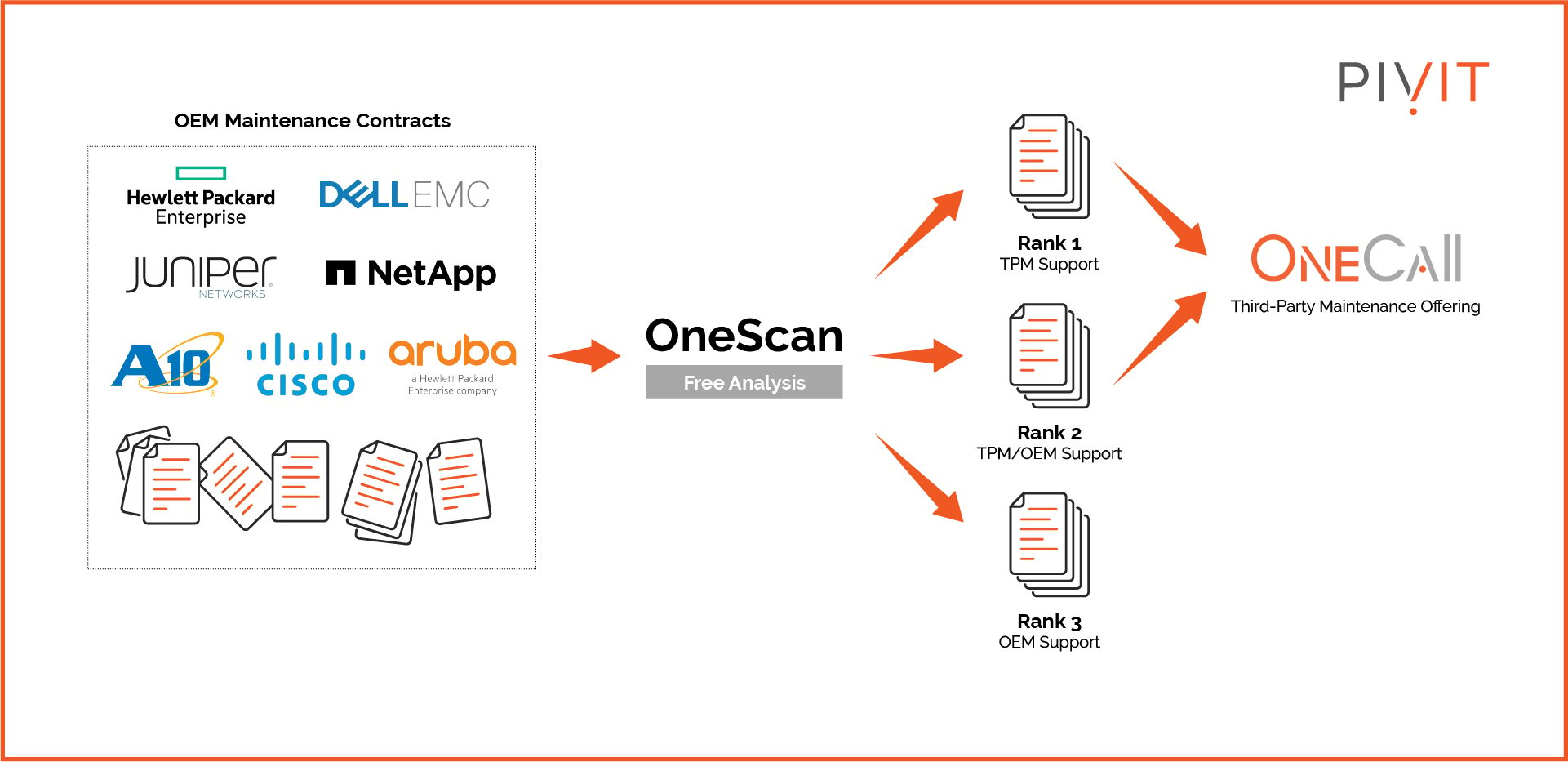
PivIT's OneCall Rank tool organizes equipment into three categories to determine where OEM support and TPM make the most sense.
| Rank | Description | Recommended Action |
|
Rank 1 |
Legacy devices or equipment the OEM no longer supports directly; software updates have ceased or are available separately |
Strong TPM candidates — typically the most accessible savings |
| Rank 2 | Equipment that may still qualify for OEM support, but where the business strategy determines whether that premium is worthwhile | Joint decision between procurement, engineering, and IT asset management |
| Rank 3 | Newer devices dependent on the OEM for restricted software updates, patches, licenses, or subscriptions | Keep on OEM support until requirements change |
The goal isn't to move everything to TPM. It's to stop paying the same premium for assets with fundamentally different support requirements.
What a Hybrid Strategy Delivers
An optimized hybrid maintenance strategy can help organizations:
- Extend the useful life of stable infrastructure
- Avoid hardware refreshes driven solely by OEM milestones
- Consolidate multi-vendor support under fewer contracts
- Align SLAs with actual asset criticality
- Improve visibility into contract terms and lifecycle dates
- Redirect budget toward security, modernization, or other priorities
In one real example, a global beverage company saved approximately $1 million annually after consolidating a fragmented maintenance environment where more than half of its infrastructure had reached EOSL. The savings came from analyzing the estate and matching coverage to actual needs — not applying the same decision to every device.
Get Your Maintenance Strategy Off Auto-Pilot
Your maintenance spend should reflect your business requirements — neither a blanket OEM renewal nor a blanket shift to third-party support.
A PivIT maintenance advisor can evaluate your estate list, map lifecycle milestones, identify OEM-only dependencies, right-size your SLAs, and show where TPM can reduce OpEx without creating avoidable risk. Visit OneCall to compare your current coverage against an optimized hybrid strategy.
Frequently Asked Questions
What is third-party maintenance?
TPM is hardware support provided by a company other than the original equipment manufacturer. It can include technical support, hardware replacement, spare parts logistics, depot repair, and on-site service.
Which assets are good TPM candidates?
Post-warranty, EOL, and EOSL assets are the most common candidates — particularly when they're stable, still meet business requirements, and don't depend on restricted OEM entitlements.
Can a hybrid strategy actually reduce OpEx?
Yes. By retaining OEM coverage only where necessary and using TPM for eligible hardware, organizations can meaningfully reduce maintenance spend. Actual savings depend on asset mix, location, SLA, and contract scope.
Which milestones should trigger a support review?
Review at warranty expiration, end of sale, end of software maintenance, end of life, end of service life, and before every contract renewal.